AI Quiz Generator: Turn PDFs and Notes into Real Practice Tests
Master any subject faster using AI to convert your study materials into practice tests. Learn how active recall and spaced repetition can transform your preparation.
AI Quiz Maker Team
Article Author
11 min read
Estimated Reading
April 9, 2026
Last Updated
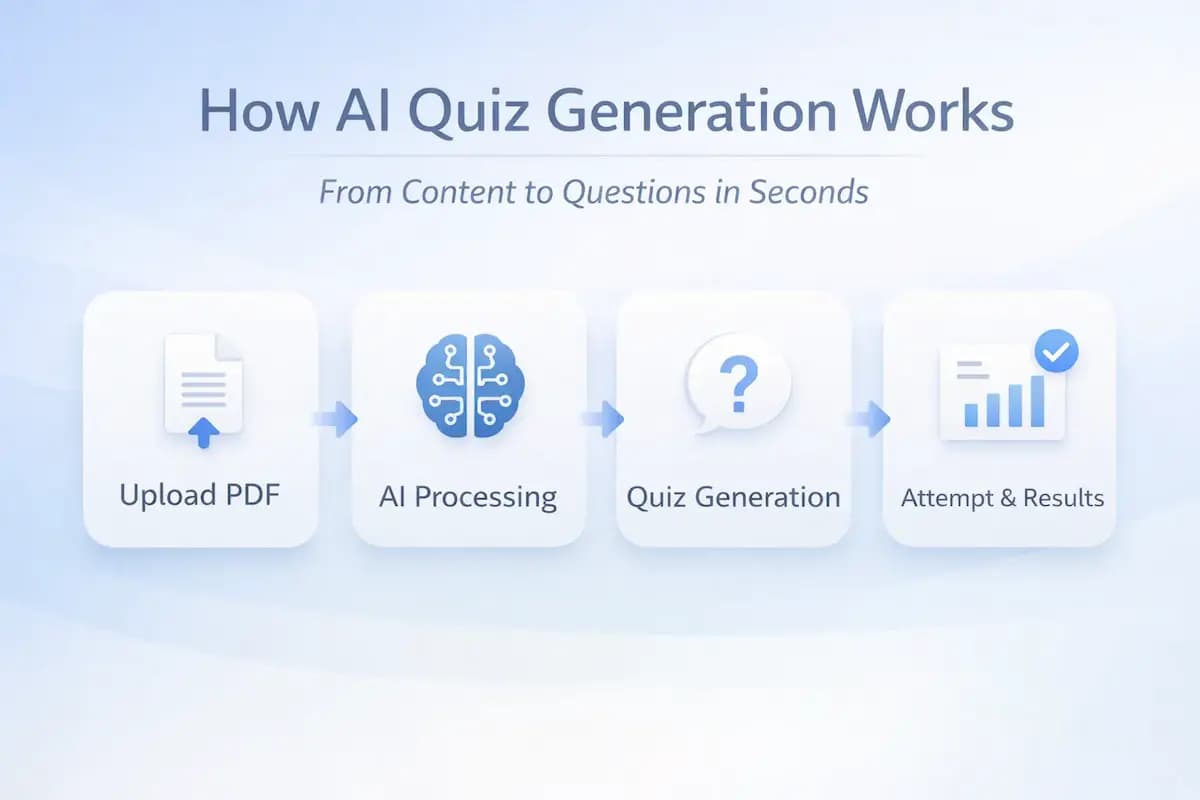
A common situation appears during study time where you spend hours reading a full chapter carefully, and by the end everything looks clear because the content feels familiar in your mind. The next day, when you try to answer a question without looking at the book, your mind goes blank on basic points, and that gap clearly shows the difference between recognition and actual recall.
The reason is quite clear, because reading builds familiarity while answering requires you to pull information without support. Most study routines stay limited to reading, due to which recall never gets trained in a real test situation.
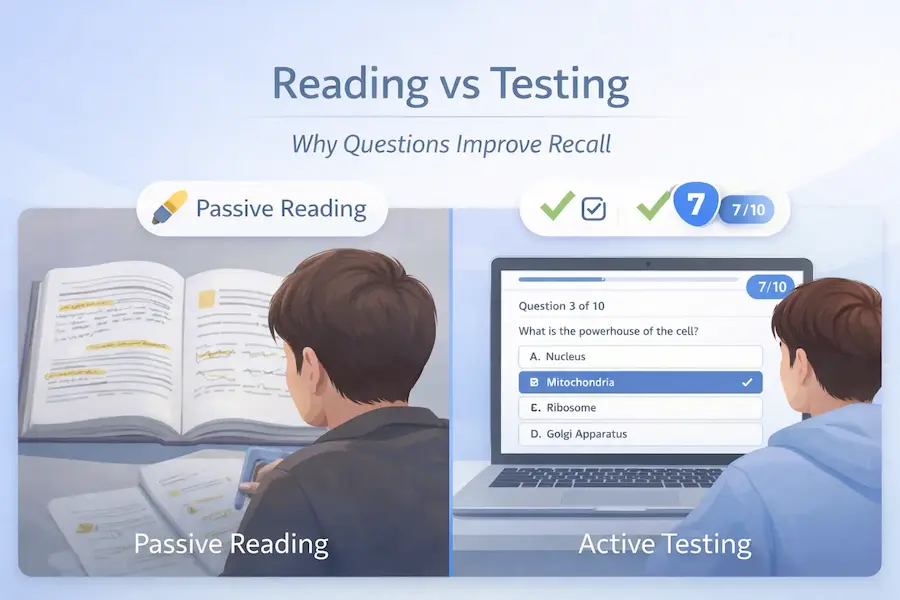
Now think about this shift, where instead of reading the same chapter again, you upload it into a quiz tool and let the system turn that material into questions. The moment you start answering, hesitation appears on topics that seemed easy before, and that hesitation is where actual learning starts.
What an AI Quiz Generator Actually Does#
When you open the tool, you see options to upload a PDF or paste notes, and you choose the option that matches your material and move ahead. On the next screen, you select your file, and the system starts processing it while showing a loading state that indicates content analysis is in progress.
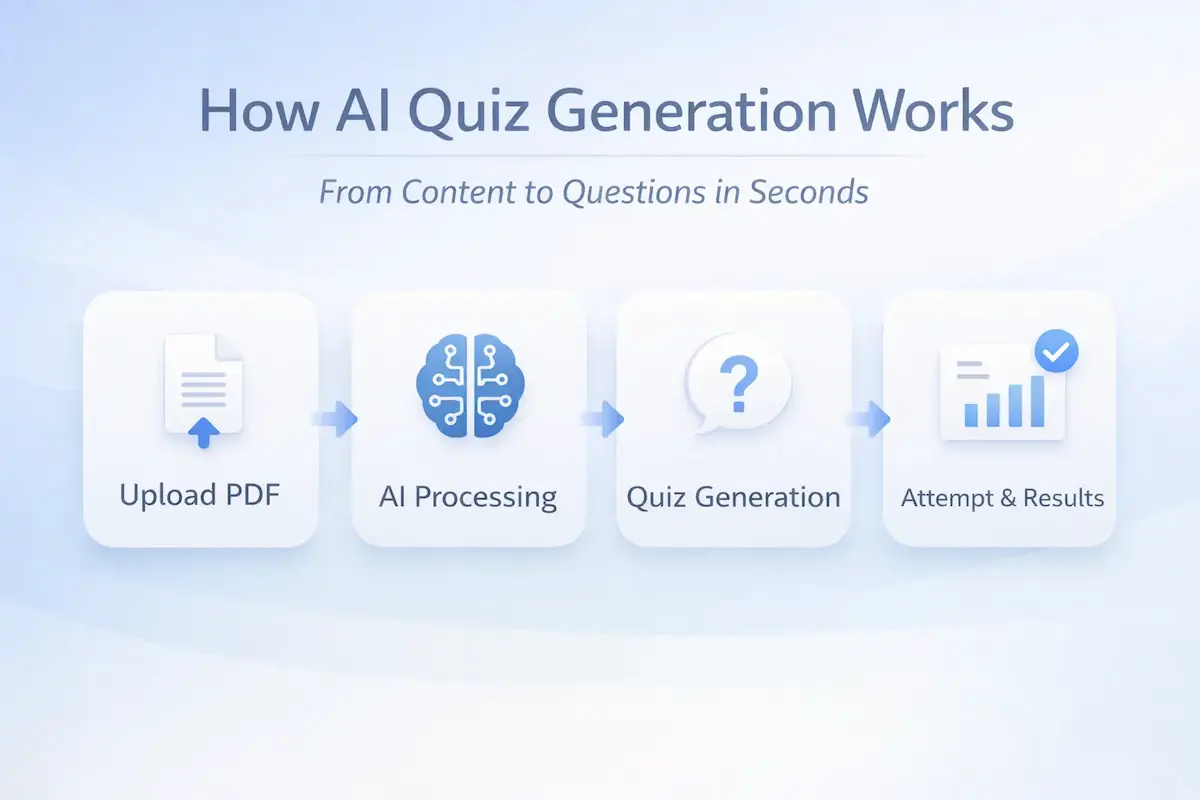
The system does not just read lines, because it identifies concepts and relationships and prepares questions from those connections inside the source material. After processing ends, a quiz interface appears with structured questions, and you answer them directly on the screen.
When you submit the quiz, results appear instantly with correct and wrong answers, and your score is shown along with saved performance for later review. That visibility changes how you revise, because weak areas become clear in one attempt.
What actually happens step by step#
| What you do | What system does | What you see |
|---|---|---|
| You upload a PDF or paste notes | The system reads and processes the content | A processing screen appears |
| You click generate quiz | The system builds questions from concepts | A quiz interface appears |
| You answer questions | The system evaluates answers instantly | A result screen appears |
| You review performance | The system stores results and tracks history | A summary with weak areas |
Where Your Current Study Method Breaks#
You read a paragraph twice and it seems familiar, and that familiarity makes it look like you understand it fully. When you try to recall the same idea without looking, you struggle because recognition does not turn into recall automatically.
You write your own questions and it works for a few attempts, but after some time the effort becomes heavy and you stop, due to which consistency breaks. You also finish a chapter without knowing which parts are weak, because there is no feedback that shows what went wrong.
Real problems you can notice in yourself#
- You read again but still cannot answer without looking
- You seem confident while reading but struggle during testing
- You start question creation but stop after some time
- You finish revision but cannot identify weak areas
The First Workflow You Will Actually Follow#
You open the tool and upload your content such as a PDF, notes, or slides, and once the file is added, you move to the settings section. On this screen, you enter a test name, choose a category if needed, and select a difficulty level that matches your preparation stage.
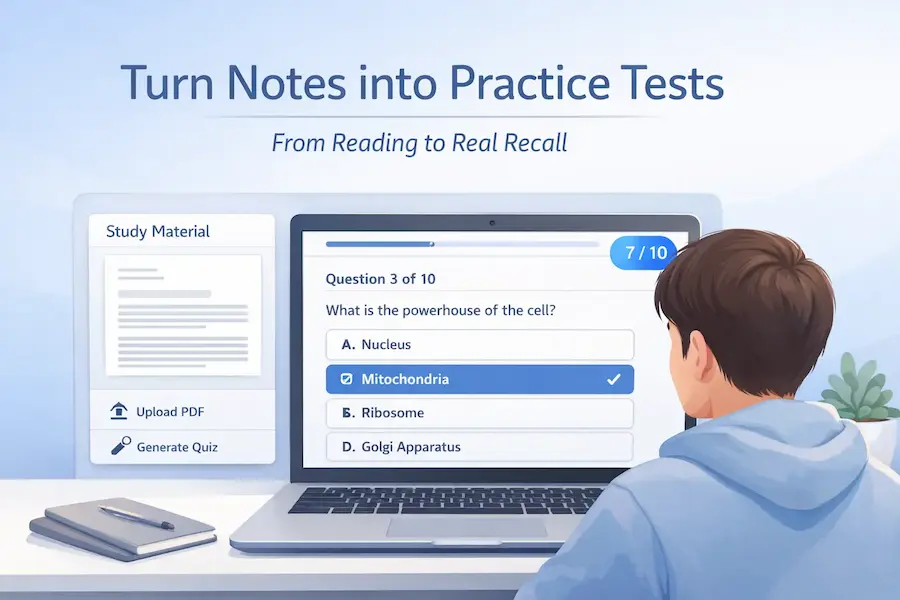
You can also enable timed mode to simulate exam conditions, where the quiz auto submits when time ends. After that, you click generate quiz and wait for processing, and then the quiz appears with questions prepared from your content.
You answer the questions and notice that some are direct while others require more thought, and that pause shows where your understanding needs more work. After submission, results appear with your score and mistakes, and you focus only on those weak parts instead of reading everything again.
Full workflow breakdown#
| Step | What you do | What appears |
|---|---|---|
| Step 1 | Upload PDF or paste notes | File preview or input area |
| Step 2 | Select difficulty and settings | Options for level and timed mode |
| Step 3 | Generate quiz | Processing screen |
| Step 4 | Answer questions | Quiz interface |
| Step 5 | Submit and review | Result screen |
What Can Go Wrong and How You Fix It#
If your input is weak, your output also becomes weak, so you need to pay attention to what you upload. A poor quality or unclear PDF causes wrong reading by the system, due to which questions seem incorrect and confusing.
Short or incomplete notes do not provide enough context, and the system creates shallow questions that do not test understanding properly. A very high difficulty level can also create confusion instead of learning, because the questions move beyond your current level.
You may also skip review and move to the next quiz too quickly, because the result screen appears and you want to continue without checking mistakes. That habit causes the same errors to return, so you should always check wrong answers and revise that part before the next attempt.
Common issues and what you should do#
| Problem | What happens | What you should do |
|---|---|---|
| Poor quality PDF | Questions seem unclear | Upload a clean file |
| Incomplete notes | Questions lack detail | Add more context |
| Wrong difficulty level | Questions seem confusing | Choose a proper level |
| Skipping review | Mistakes repeat | Review wrong answers |
Why This Method Changes How You Study#
Reading appears easy because your brain recognizes patterns, but answering becomes harder because you must recall information without support. That difference creates a correction moment when you get an answer wrong and immediately see the right one, which is closely related to the idea behind the active recall learning method where answering improves memory more than reading.
You then revise only weak parts and answer again, and recall becomes faster with each cycle because you fix errors instead of repeating everything. This repeated practice connects with the spaced repetition study technique, where revisiting topics over time improves retention and understanding.
This loop of attempt, correction, and another attempt gradually changes your study pattern toward targeted practice. This is also why systems built on quizzes rely on structured formats like MCQs, because research around how multiple choice questions improve learning shows that question-based testing strengthens recall better than passive review.
How Settings Change Your Quiz Output#
A practical detail appears at this stage where the same content can produce very different questions based on the settings you choose, and that is something many users do not pay attention to in the beginning. The system gives you control over difficulty level, number of questions, and timed mode, and each of these changes how the quiz behaves on your screen.
A lower difficulty level creates direct questions based on definitions and basic facts, while a higher level produces questions that require you to connect ideas and think more carefully before answering. A timed quiz creates pressure similar to an exam, while an untimed quiz gives you space to think without time limits.
How settings affect output#
| Setting | What changes in quiz | What you notice |
|---|---|---|
| Difficulty level | Question complexity changes | Easy questions are direct, harder ones require thinking |
| Number of questions | Coverage of content increases | More questions cover more parts of chapter |
| Timed mode | Time restriction applies | Auto submit when time ends |
| Assertion reason | Advanced questions appear | Questions test logic and reasoning |
How You Track Your Progress Over Time#
A useful part of the system appears after multiple attempts, where your quiz history starts building up and shows how your performance changes over time. Instead of guessing your preparation level, you can see your scores, mistakes, and improvements clearly.
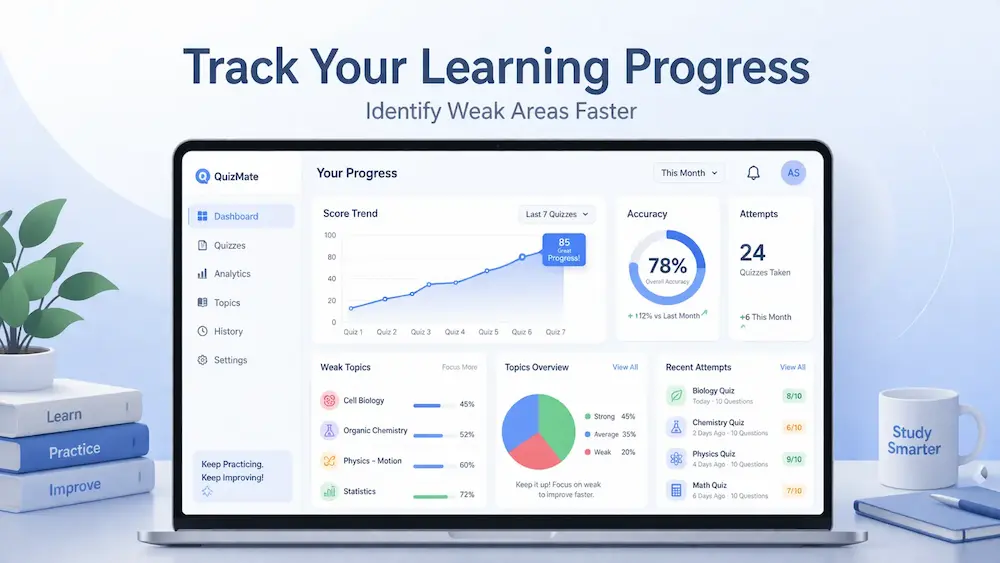
A user attempts one quiz and scores low, then revises weak parts and attempts again, and the next score improves because errors were corrected earlier. This repeated cycle gives you a clear view of which topics improve and which ones still need attention.
A system stores your attempts and shows patterns such as repeated mistakes or steady improvement, and this helps you decide what to revise next instead of randomly picking chapters again.
What you see in performance tracking#
| Activity | What system records | What it shows |
|---|---|---|
| Quiz attempt | Score and answers | Correct vs incorrect ratio |
| Multiple attempts | History over time | Improvement or repeated mistakes |
| Topic based errors | Weak areas | Topics that need revision |
| Timed quizzes | Time performance | Speed and accuracy together |
How Export Helps in Real Study Situations#
A practical need appears when you want to revise without opening the tool every time, and this is where export becomes useful in real scenarios. After completing a quiz, you can export it as a PDF along with answer keys, and use it later for offline practice.
A student may download quizzes before an exam and revise them like practice papers, while a teacher may share exported quizzes with students as assignments. This makes the output usable outside the platform as well. Check our pricing page for more features.
Alternative Study Approach Without Quiz Tools#
A different approach exists where you try to study without using a quiz tool, and that usually includes reading, highlighting, and writing notes manually. This approach works to some extent, but it does not create a clear testing loop where mistakes become visible immediately.
A student reads multiple chapters and highlights important lines, but when questions appear, there is no structured way to test understanding quickly. A student may also try to write questions manually, but consistency becomes difficult to maintain over time.
Comparison of both approaches#
| Method | What you do | Limitation |
|---|---|---|
| Traditional study | Read and highlight | No clear feedback on weak areas |
| Manual questions | Write your own questions | Time consuming and inconsistent |
| Quiz based method | Answer generated questions | Immediate feedback and correction |
| Repeated attempts | Retry after revision | Clear improvement tracking |
A related pattern appears in other tools where content is first analyzed before any output is shown, and that same idea is used in products like AI Tools for UI Analysis where the system studies layouts and components before presenting insights. The underlying approach is similar here as well, because the system processes your material first and then presents structured questions that reflect what actually matters.
Final Clarity on How This Fits Your Study Routine#
A clear pattern appears once you use this system for a few chapters, because your study stops being repetitive and starts becoming targeted based on mistakes. Instead of going through the same content again, you focus only on what you got wrong and improve that part first.
A student who follows this process across subjects starts seeing faster recall during tests, because the brain is trained to answer instead of just recognize. That shift from reading to answering is what changes the outcome over time. Login now to start your transformation.
Frequently Asked Questions#
Can you really convert any PDF into a quiz?#
A system can process most readable PDFs and convert them into questions, but the quality depends on how clear and structured the content is. If your file contains proper text and clear explanations, the questions will reflect that structure more accurately.
What type of content works best for quiz generation?#
Content that includes clear explanations, definitions, and structured points works better because the system can identify concepts more easily. Very short notes or incomplete content may not produce strong questions, so you should always provide enough detail.
How many times should you attempt the same quiz?#
You can attempt the same quiz multiple times after revising weak areas, and each attempt shows how your recall improves over time. A second or third attempt after correction usually gives better results because mistakes are already addressed.
Does difficulty level really make a difference?#
Difficulty level changes how questions are framed, because easier levels focus on direct facts while higher levels require more thinking and connection between ideas. You should select the level based on your current preparation instead of jumping to higher levels immediately.
Can you rely only on quizzes without reading?#
A quiz works best after you read the content at least once, because it tests what you already studied instead of replacing the study process completely. The tool acts as a practice layer that turns reading into testing, not as a full replacement for learning.